
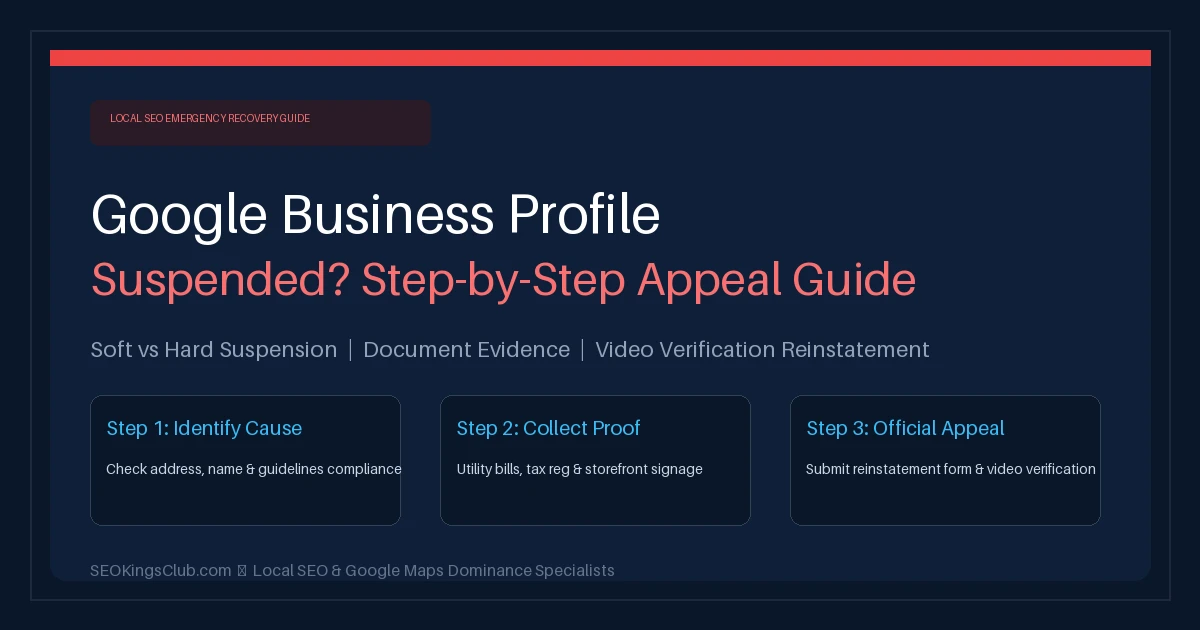
Waking up to see that your Google Business Profile suspended notice has arrived is one of the most stressful emergencies any local business owner can face. Overnight, your Google Maps listing vanishes, your customer reviews disappear from view, and the steady stream of incoming phone calls and directions requests comes to a sudden halt.
According to recent local search data, over 70% of high-intent local customer calls originate directly from Google Maps 3-pack listings. When Google flags your listing as “Suspended” or “Disabled,” every hour of delay represents lost revenue and lost customers going straight to your competitors.
However, the worst mistake you can make right now is submitting a hasty, emotional reinstatement appeal without fixing the root policy violation. Under Google’s updated 2026 enforcement algorithms, submitting an incomplete appeal often results in an automated “Not Approved” rejection—making subsequent reinstatement exponentially more difficult.
At SEOKingsClub, our specialized local search recovery team has successfully resolved hundreds of complex suspensions across Pakistan, the UAE, and global markets. In this definitive 2026 guide, we walk you through the exact step-by-step framework to diagnose why your listing was suspended, compile bulletproof legal evidence, master Google’s appeals workflow, and ace live video call verifications to restore your listing quickly.
Table of Contents
- 1. Soft Suspension vs. Hard Suspension: Know Your Status
- 2. The 7 Most Common Reasons Google Suspends Profiles in 2026
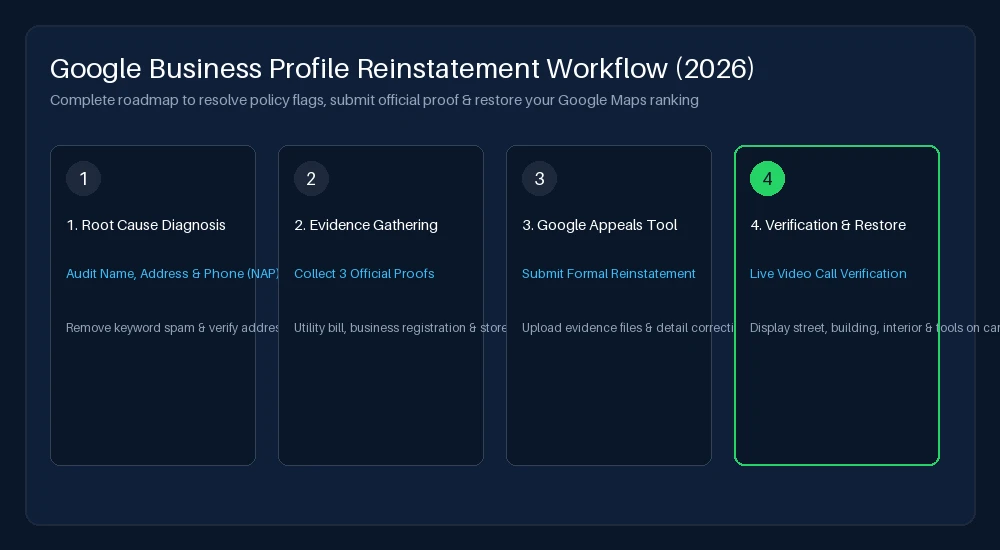
- 3. Phase 1: The Essential Pre-Appeal Compliance Audit
- 4. Phase 2: Gathering Irrefutable Official Business Proof
- 5. Phase 3: Navigating the 2026 Google Business Profile Appeals Tool
- 6. Phase 4: How to Pass Google Live Video Call Verification
- 7. What to Do If Your Reinstatement Appeal Is Rejected
- 8. How to Protect Your Google Listing from Future Suspensions
- 9. Frequently Asked Questions (FAQ)
1. Soft Suspension vs. Hard Suspension: Know Your Status
Before taking any action, you must determine which type of suspension Google has applied to your listing. The severity dictates the exact remediation steps required:
| Suspension Type | Visual Symptoms on Google | Dashboard Message | Severity Level |
|---|---|---|---|
| Soft Suspension | Listing still appears on Google Maps, but appears “Unclaimed.” You cannot edit details or manage reviews. | “Suspended” (User access revoked or policy flag on account) | Moderate (Easier Reinstatement) |
| Hard Suspension | Listing is completely de-indexed. Searching your exact business name yields zero Google Maps results. | “Suspended – Deceptive Content” or “Disabled” | Critical (Requires Formal Evidence Appeal) |
In a Soft Suspension, your primary concern is proving legitimate ownership and manager credentials. In a Hard Suspension, Google’s trust and safety team believes the listing violates core guidelines (e.g., deceptive content, fake address, or keyword stuffing), requiring formal legal verification documents.
2. The 7 Most Common Reasons Google Suspends Profiles in 2026
Google updates its automated spam detection models weekly. Over 85% of suspensions are triggered automatically by artificial intelligence algorithms when certain profile parameters change. Here are the leading triggers:
- Keyword Stuffing in the Business Name: Adding modifiers like “Best Plumber in Lahore” or “Top Car Rental Dubai” to your official registered business name violates Google’s Representing Your Business guidelines. Your profile name must match your legal tax documents and permanent outdoor signage exactly.
- Virtual Offices, P.O. Boxes, and Co-Working Spaces: Google strictly forbids using virtual mailboxes, UPS store addresses, or unstaffed co-working desks as a public storefront. If customers cannot physically walk in and find dedicated permanent signage during stated business hours, the address is invalid.
- Inappropriate Storefront vs. Service Area Business (SAB) Setup: If you operate from a home or residential address and travel to clients, you must hide your street address and configure service areas. Displaying a residential house as a public storefront is a prime suspension trigger.
- Rapid Editing of Core Profile Information: Changing your business name, primary category, street address, and phone number simultaneously flags Google’s security systems, suspecting an account hijacking.
- Multiple Listings for the Same Business Location: Creating separate profiles for different service lines (e.g., “City Dental Clinic – Teeth Whitening” and “City Dental Clinic – Braces”) at the same physical suite is considered duplicate spam.
- Suspicious Manager Account: If a user account invited to your profile as a Manager or Owner is flagged on other suspended profiles, the penalty can spread contagiously across connected listings.
- Discrepancies in Name, Address, and Phone (NAP) Consistency: If your website footer, government registration, and business directories list conflicting contact details, Google’s validation bots flag the profile for deceptive information.
3. Phase 1: The Essential Pre-Appeal Compliance Audit
Before opening Google’s appeal form, you must thoroughly clean and fix your profile. Submitting an appeal while your profile is still in violation guarantees an immediate rejection.
Step-by-Step Clean Up Checklist:
- Revert Business Name to Legal Reality: Strip out all marketing slogans, city names, and keyword phrases. If your legal company name is “Alpha Logistics”, rename the profile strictly to “Alpha Logistics”.
- Check Address & Storefront Toggle: If your office does not have permanent outdoor signage visible from the street, immediately toggle your address to hidden and configure appropriate service areas.
- Harmonize Primary Business Category: Select the single most accurate primary category that reflects your core revenue operation. Avoid picking dozens of irrelevant secondary categories.
- Audit Website Alignment: Ensure your website’s header, footer, and contact page display the exact same phone number, business name, and street address.
4. Phase 2: Gathering Irrefutable Official Business Proof
Google’s appeals team will not reinstate a listing based on verbal explanations. You must present high-resolution, unedited official documentation. Prepare a single ZIP file or Google Drive folder containing the following documents:
Official Evidence Checklist for Google Appeals:
- Utility Bill Under Company Name: A recent (last 90 days) electricity, gas, water, or landline phone bill displaying your exact business name and matching physical street address.
- Official Tax or Business Registration: National Tax Number (NTN certificate), SECP company registration, Trade License, or Chamber of Commerce membership document.
- Physical Storefront / Office Signage Photos: Unedited wide-angle photograph showing permanent exterior building signage, suite door signage, street name, and interior work desks.
- Commercial Lease Agreement: Signed commercial tenancy contract specifying the landlord and tenant names and exact physical suite address.
- Branded Commercial Assets: Branded company vehicles, uniforms, business cards, and official letterheads.
Need Urgent Help Reinstating Your Suspended Google Listing?
A rejected appeal can permanently lock your listing. SEOKingsClub senior local search specialists handle evidence preparation, legal justification letters, and direct Google specialist escalation to recover your calls and rankings fast.
5. Phase 3: Navigating the 2026 Google Business Profile Appeals Tool
In late 2023 and throughout 2024–2026, Google phased out the old static reinstatement forms in favor of the interactive Google Business Profile Appeals Tool. Follow these exact steps:
- Navigate to the official Google Business Profile Appeals Tool while logged into the Google Account associated with the suspended listing.
- Select your business profile from the dropdown list. The tool will display the formal reason (e.g., “Content that violates policies: Deceptive content”).
- Click Appeal. You will be prompted to confirm that your profile is currently compliant with all guidelines.
- Upload your evidence files. Note that the tool enforces a strict 60-minute window to submit evidence once the appeal is initiated. Have all PDFs and photos ready beforehand.
- Draft a concise, professional explanation. Avoid emotional complaining. State clearly:
“Our company [Legal Business Name] has operated continuously at [Full Physical Address] since [Year]. We have audited our profile to ensure 100% compliance with all Google Business Profile guidelines. Attached please find our official business registration certificate, recent utility bill, and photos of our permanent exterior signage and physical premises. We kindly request reinstatement of our verified listing.”
- Submit the appeal and record the unique Case ID generated in the confirmation email. Google’s review typically takes between 3 to 7 business days.
6. Phase 4: How to Pass Google Live Video Call Verification
Increasingly in 2026, Google’s appeals team requests a Live Video Verification call before final reinstatement approval. Failing this live video call will result in immediate permanent suspension. Follow these critical preparation guidelines:
What You Must Capture on Camera:
- Street Signs and Exterior Landmark: Start outside the building. Show the street name sign, the building exterior, and nearby recognizable businesses.
- Permanent Exterior Signage: Show your company’s permanent metal or acrylic signage fixed to the building wall or directory board. (Paper printouts taped to a door will be rejected immediately).
- Unlocking the Door: Film yourself using physical keys or keycard access to unlock the office suite, demonstrating operational custody.
- Interior Working Space: Walk through the reception, staff desks, computers, equipment, and company letterhead or business cards laid out on the desk.
- Official Documentation on Camera: Have the original physical copies of your tax registration, lease agreement, and utility bill ready to show in crisp focus.
7. What to Do If Your Reinstatement Appeal Is Rejected
If you receive an automated notification stating “Not Approved – Your appeal has been denied”, do not lose hope. You have two formal escalation paths:
- Request Additional Review via Support Form: Google permits a secondary review if you can submit supplementary evidence that was not included in the initial submission (e.g., video walkthrough links or government trade portal verification).
- Escalation via Google Business Profile Help Community: Gold and Platinum Product Experts on Google’s official forum have direct escalation paths to the internal Trust & Safety engineering team. By presenting your case ID and clean documentation, an expert can manually flag your profile for human review.
- Engage Professional Local SEO Specialists: At SEOKingsClub, our team specializes in difficult, high-stakes reinstatements. We audit the complete digital footprint, eliminate conflicting data across national aggregators, and manage direct communications with Google’s policy team.
8. How to Protect Your Google Listing from Future Suspensions
Once your profile is successfully reinstated, take proactive measures to ensure long-term stability and dominance in local search results:
- Maintain Pristine NAP Consistency: Keep your business name, address, and phone number 100% identical across your website, Google Business Profile, and all digital directories.
- Assign Dedicated User Roles: Never share primary owner login credentials. Add marketing team members as “Managers” rather than “Owners” so their access can be managed independently.
- Avoid Sudden Bulk Edits: If you need to update business hours, phone numbers, or categories, make incremental edits rather than updating all fields simultaneously.
- Pair Local Maps with Organic Search: A strong local presence requires a robust organic foundation. Combining Google Maps optimization with authoritative local SEO services ensures your business remains resilient against algorithm shifts.
- Learn More About Quality Agency Partnerships: Read our detailed guide on how to choose an SEO agency to understand how top search teams safeguard your local digital presence.
9. Frequently Asked Questions (FAQ)
How long does it take for Google to reinstate a suspended profile?
Once an official appeal is submitted through the 2026 Appeals Tool with complete documentation, Google typically reviews and resolves the case within 3 to 7 business days. Complex cases requiring secondary escalation or video verification can take between 10 to 14 days.
Will I lose my existing Google reviews if my profile is reinstated?
In the vast majority of successful reinstatements, all your original customer reviews, photos, and star ratings are completely restored. In rare cases where reviews take 48-72 hours to re-sync after reinstatement, Google support can restore them using your listing’s Place ID.
Can I just create a new Google Business Profile instead of appealing?
No! Creating a duplicate profile for the same business name and address while an existing profile is suspended violates Google’s anti-spam policies. The new profile will almost certainly be suspended immediately, and creating duplicate profiles can lead to permanent blacklisting of your business domain and physical location.
Why was my Google listing suspended for ‘Deceptive Content’?
‘Deceptive Content’ is Google’s default algorithmic flag for any mismatch between your real-world business and your digital profile. Common triggers include keyword stuffing in the business name, using a virtual office address, having contradictory NAP details online, or failing automatic video re-verification checks.
Can SEOKingsClub recover my suspended Google Business Profile?
Yes. Our dedicated local SEO recovery specialists have successfully resolved complex suspensions for clients across Pakistan and overseas. Contact us directly at +92 345 0435772 for a free case evaluation.